Name services or “Domain Name System (DNS)”, sometimes confusingly called “Directory Services”, refer to the network service(s) responsible for translating the names of domain objects into IP addresses. The idea being that even a small number of numerical IP addresses are difficult to remember, while a similar number of names (i.e. redbarrel.net) are easier for humans to deal with.
Subsections of Name Services
DNS Record Notation & samba-tool DNS Commands
DNS names are structured using . as delimiter between segments of the name, also describing the DNS hierarchy for that object.
Relative Distinguished Name (RDN)
A partial DN, even if it is just the object name on its own. An RDN is thus meaningless without a reference to a location in the directory. It is also possible to cite the same RDN for two different objects; though no two objects may have the same DN.
Examples of relative distinguished names:
cn=csantana
cn=csantana,ou=Users
Note
Due to the special meaning of the . I ended up finding extra “functionality” in the Microsoft Management Console (MMC) DNS client. I had been using this DNS client to manage my Samba domain and decided to create a new DNS entry for wap.homenet. Since the new object name included the . the DNS client treated it as a relative distinguished name and created an OU called homenet, under which it placed the wap object. I suppose I prefer this instead of having the DNS client simply give an error telling me that . is not allowed in object names. This functionality certainly can make creating new object OUs more streamlined.
Since I wasn’t expecting this I ended up trying to delete the OU in MMC DNS client, but was given the error that deletion wasn’t supported for this type of object. I guessed this was because my DNS server was based on Samba rather than Active Directory (with MMC DNS likely expecting to be connected to AD). So I logged in to the server to run the following delete command directly.
Samba DNS entry deletion commands:
Example
samba-tool dns delete localhost domain.tld domainnet A 192.168.1.50 -U administrator
Command Form
samba-tool dns delete <server-ip> <dnszone> <record> <A|AAA|PTR|CNAME|NS|MX|SRV|TXT> <data> [options]
Interestingly, when deleting the wap.homenet object the homenet object that remained was tranformed from an OU into an end node.
LDAP Structure Explained (Active Directory)
LDAP is composed primarily of objects, and secondarily by the relationship of objects to one another and to other LDAP directories.
LDAP is organized into a scheme or possibly several schema. A scheme is a defined hierarchy of objects and collections of objects. While schema can be user defined, the majority of installations utilize a standard scheme, one which can be considered a convention. The simplest and most widely used would be Active Directory. This scheme uses 3 primary objects categories:
Common Name (CN): These objects are end nodes, or leaves, which do not fall into either of the following object categories
Domain Component (DC): represents objects at the top of the hierarchical tree and are associated with DNS. Uses DNS do define this name space
Organizational Unit (OU): acts as a container to hold other objects. OUs are only meant to define logical areas or groupings of a particular domain or business use case, such as ‘Accounting’ or ‘Admin Office’
Distinguished Name (DN)
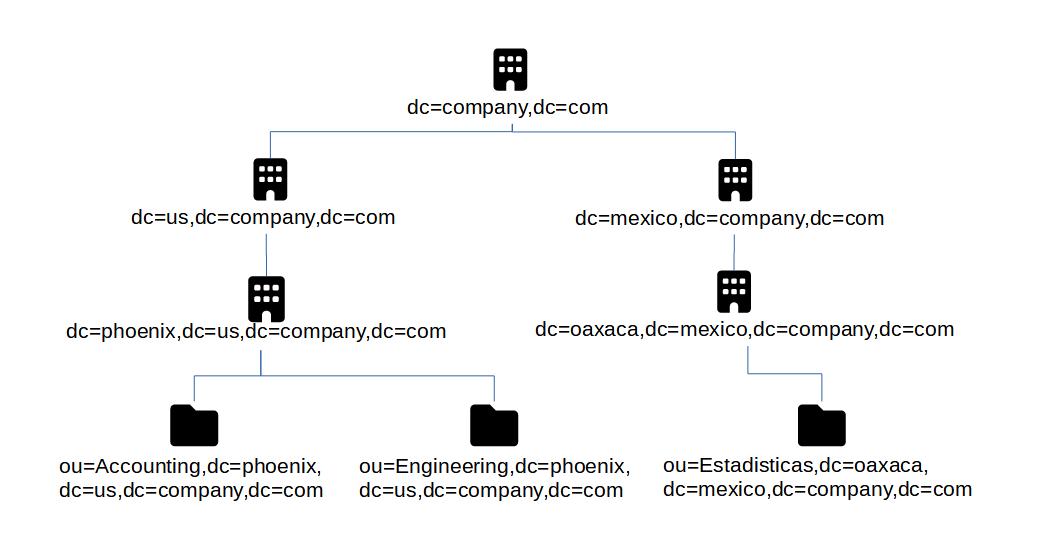
A listing of names for an object that include the entire path to the root of the LDAP namespace. Users are one of the most used Common Name objects. For example, user Tom Jones, and assuming company.com as the domain, then the Distinguished Name for Tom would be: cn=Tom Jones,ou=Users,dc=company,dc=com
Info
The order of a distinguished name is important! It starts with the most granular element and proceeds to the most general
Relative Distinguished Name (RDN)
A partial DN, even if it is just the object name on its own. An RDN is thus meaningless without a reference to a location in the directory. It is also possible to cite the same RDN for two different objects; though no two objects may have the same DN.
Examples of relative distinguished names:
cn=csantana
cn=csantana,ou=Users
Typeful Names
A typeful name includes components in the form <type>=<name>. For example: cn=Users. A typeless form may be supported by some applications, for example: Administrator, Users, company.com.
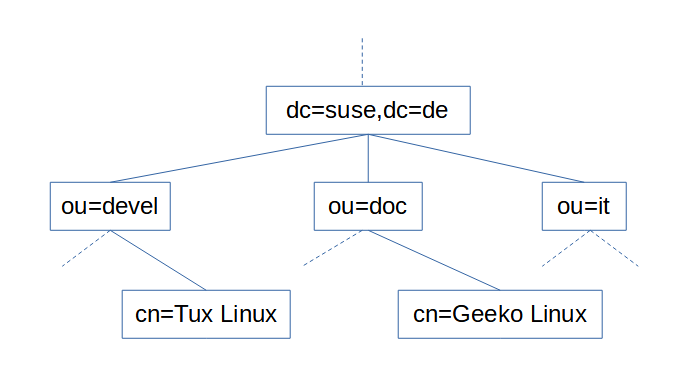
The hierarchy of LDAP is considered a tree, called the Directory Information Tree (DIT). The top and most generalized object is called root and is not actually represented by an object in the tree. It has no defined object class either. In AD the root object must come from the object class DomainDNS. Because AD uses DNS to structure its namespace, the DomainDNS object is given a DC designator. For example: dc=company,dc=com.
Directory Service Agent (DSA)
Directory Service Agents are servers that hold copies or segments of the information base. This means that the logical store of an LDAP implementation may have one or more DSAs. Of the several DSAs that may be part of one implementation, some can act as replica information bases, or as stores for only a segment of the overall implementation, e.g. if it is too large or cumbersome to host with a single DSA. Replica DSAs are handy for location diverse implementations.
Naming Context (NC)
Within DSAs are naming contexts. In AD a domain is a naming context. Since a domain controller can host more than one domain, a domain controller would be a DSA.
Naming Contexts are the boarderline between a local or foriegn object. Meaning “within” the same namespace as the object making the request, or “external” to the namespace of the object making the request. Domain/NC can ‘refer’ requests through trust relationships, if they exist, between domains. If the referred request is unknown to the DSA it is requested of, then it returns another referral. This is called walking the tree.
Root DSE
A service that manages client connections to the DSA and provides a very general structure of the DSA to the client so the client can make requests